Ch16_TableAPI
Yang Haoran 4/8/2021 FlinkJavaBigData
# TableAPI
引入依赖:【1.10版本还是用的老的planner,后期可以用blink的】
<dependency>
    <groupId>org.apache.flink</groupId>
    <artifactId>flink-table-planner_2.12</artifactId>
    <version>1.10.1</version>
</dependency>
<dependency>
    <groupId>org.apache.flink</groupId>
    <artifactId>flink-table-planner-blink_2.12</artifactId>
    <version>1.10.1</version>
</dependency>
1
2
3
4
5
6
7
8
9
10
2
3
4
5
6
7
8
9
10


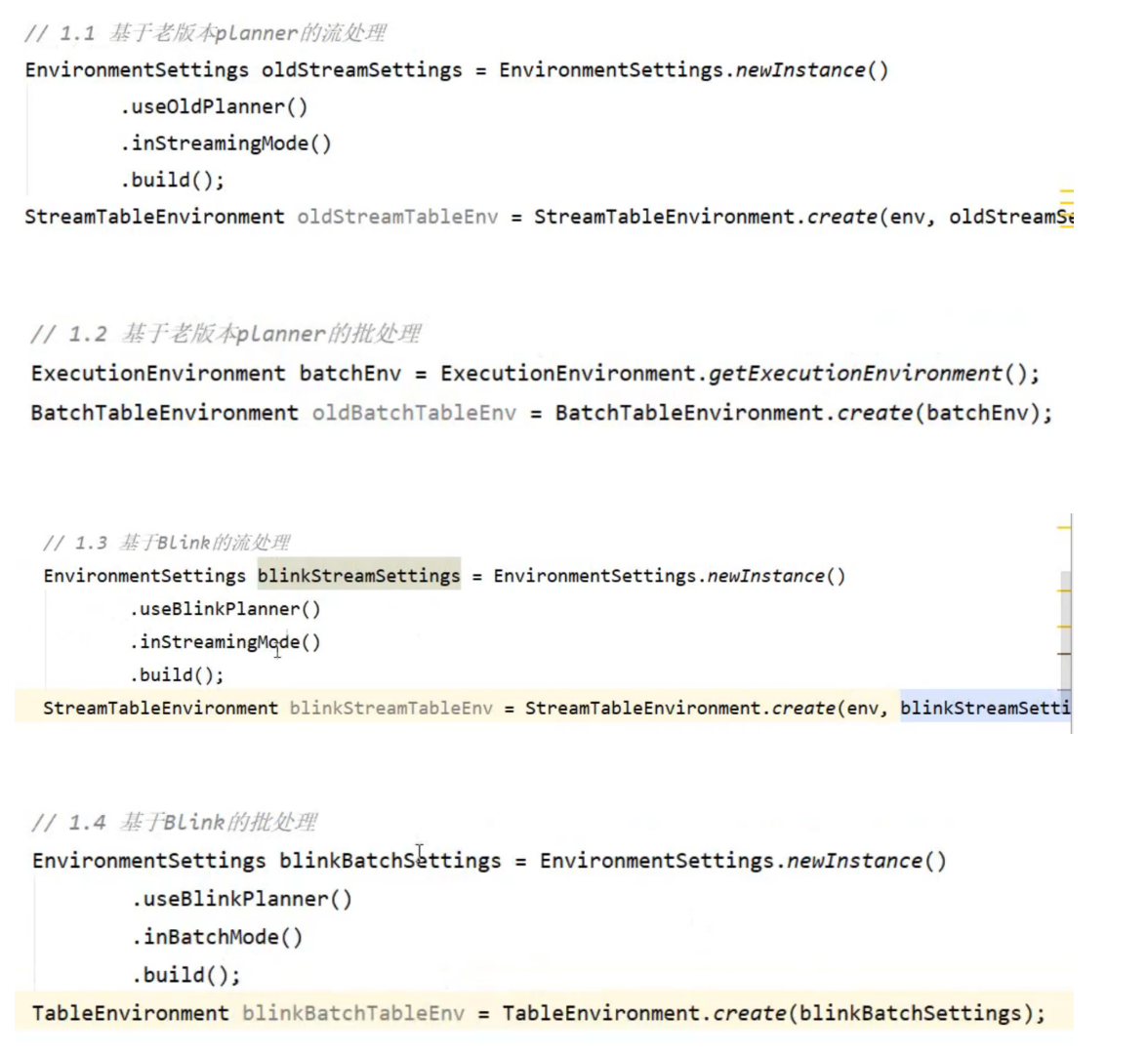
环境搭建:
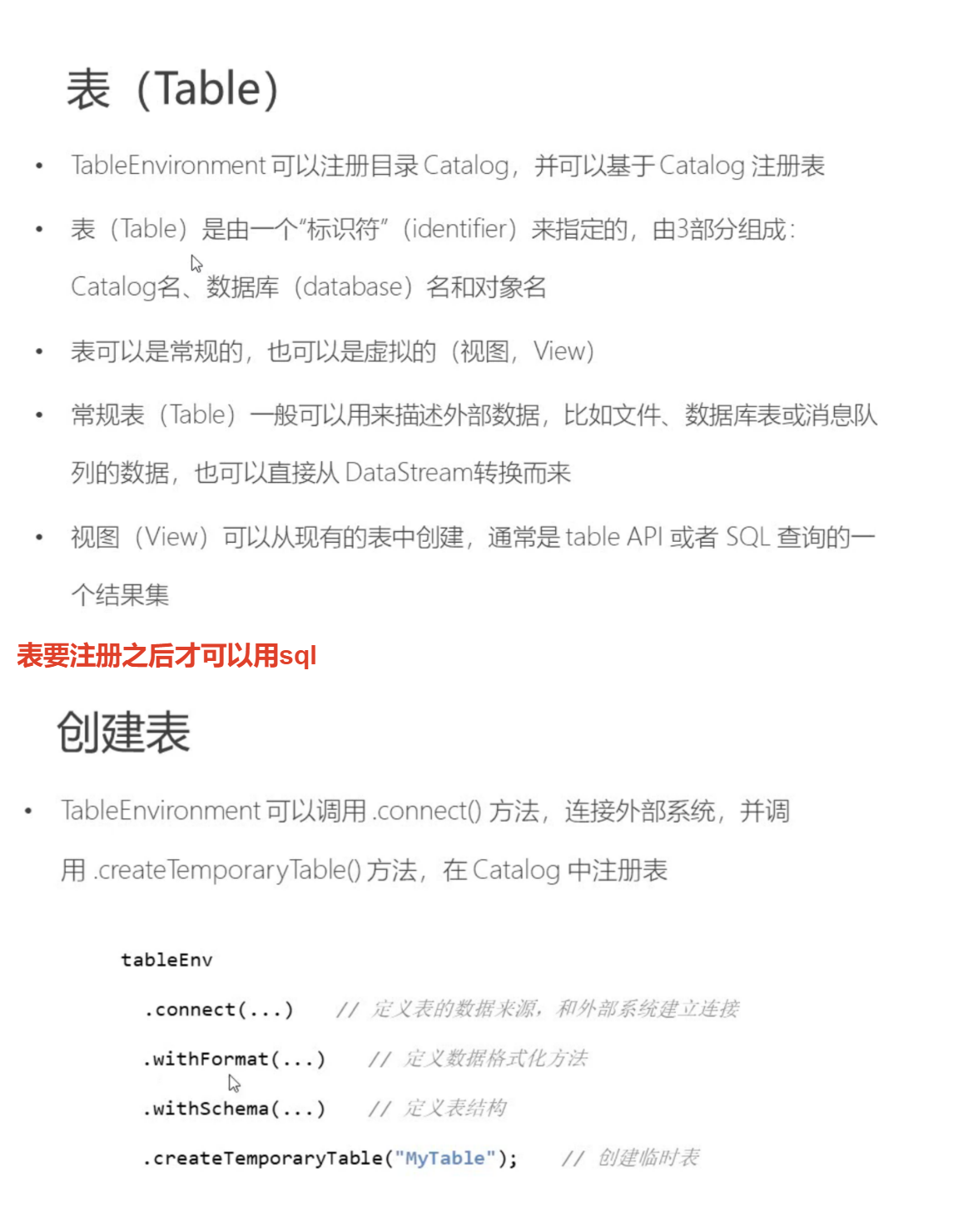
引入格式依赖,用来定义数据格式化方法:

// 3.2 SQL
        tableEnv.sqlQuery("select id, temp from inputTable where id = 'senosr_6'");
        Table sqlAggTable = tableEnv.sqlQuery("select id, count(id) as cnt, avg(temp) as avgTemp from inputTable group by id");
         // 打印输出,append是因为直接在流之后追加输出
        tableEnv.toAppendStream(resultTable, Row.class).print("result");
       //因为要更改流中的数据,所以要先撤回再添加,输出结果中的true表示添加,false表示撤回
         tableEnv.toRetractStream(aggTable, Row.class).print("agg");
        tableEnv.toRetractStream(sqlAggTable, Row.class).print("sqlagg");
1
2
3
4
5
6
7
8
2
3
4
5
6
7
8
把结果写入文件(数据有更新的不支持把表写入文件,只能支持插入操作)
public static void main(String[] args) throws Exception {
        // 1. 创建环境
        StreamExecutionEnvironment env = StreamExecutionEnvironment.getExecutionEnvironment();
        env.setParallelism(1);

        StreamTableEnvironment tableEnv = StreamTableEnvironment.create(env);

        // 2. 表的创建:连接外部系统,读取数据
        // 读取文件
        String filePath = "D:\\Projects\\BigData\\FlinkTutorial\\src\\main\\resources\\sensor.txt";
        tableEnv.connect( new FileSystem().path(filePath))
                .withFormat( new Csv())
                .withSchema( new Schema()
                        .field("id", DataTypes.STRING())
                        .field("timestamp", DataTypes.BIGINT())
                        .field("temp", DataTypes.DOUBLE())
                )
                .createTemporaryTable("inputTable");

        Table inputTable = tableEnv.from("inputTable");
//        inputTable.printSchema();
//        tableEnv.toAppendStream(inputTable, Row.class).print();

        // 3. 查询转换
        // 3.1 Table API
        // 简单转换
        Table resultTable = inputTable.select("id, temp")
                .filter("id === 'sensor_6'");

        // 聚合统计
        Table aggTable = inputTable.groupBy("id")
                .select("id, id.count as count, temp.avg as avgTemp");

        // 3.2 SQL
        tableEnv.sqlQuery("select id, temp from inputTable where id = 'senosr_6'");
        Table sqlAggTable = tableEnv.sqlQuery("select id, count(id) as cnt, avg(temp) as avgTemp from inputTable group by id");

        // 4. 输出到文件
        // 连接外部文件注册输出表
        String outputPath = "D:\\Projects\\BigData\\FlinkTutorial\\src\\main\\resources\\out.txt";
        tableEnv.connect( new FileSystem().path(outputPath))
                .withFormat( new Csv())
                .withSchema( new Schema()
                        .field("id", DataTypes.STRING())
//                        .field("cnt", DataTypes.BIGINT())
                        .field("temperature", DataTypes.DOUBLE())
                )
                .createTemporaryTable("outputTable");

        resultTable.insertInto("outputTable");
//        aggTable.insertInto("outputTable");

        env.execute();
    }
1
2
3
4
5
6
7
8
9
10
11
12
13
14
15
16
17
18
19
20
21
22
23
24
25
26
27
28
29
30
31
32
33
34
35
36
37
38
39
40
41
42
43
44
45
46
47
48
49
50
51
52
53
54
2
3
4
5
6
7
8
9
10
11
12
13
14
15
16
17
18
19
20
21
22
23
24
25
26
27
28
29
30
31
32
33
34
35
36
37
38
39
40
41
42
43
44
45
46
47
48
49
50
51
52
53
54
Sink:




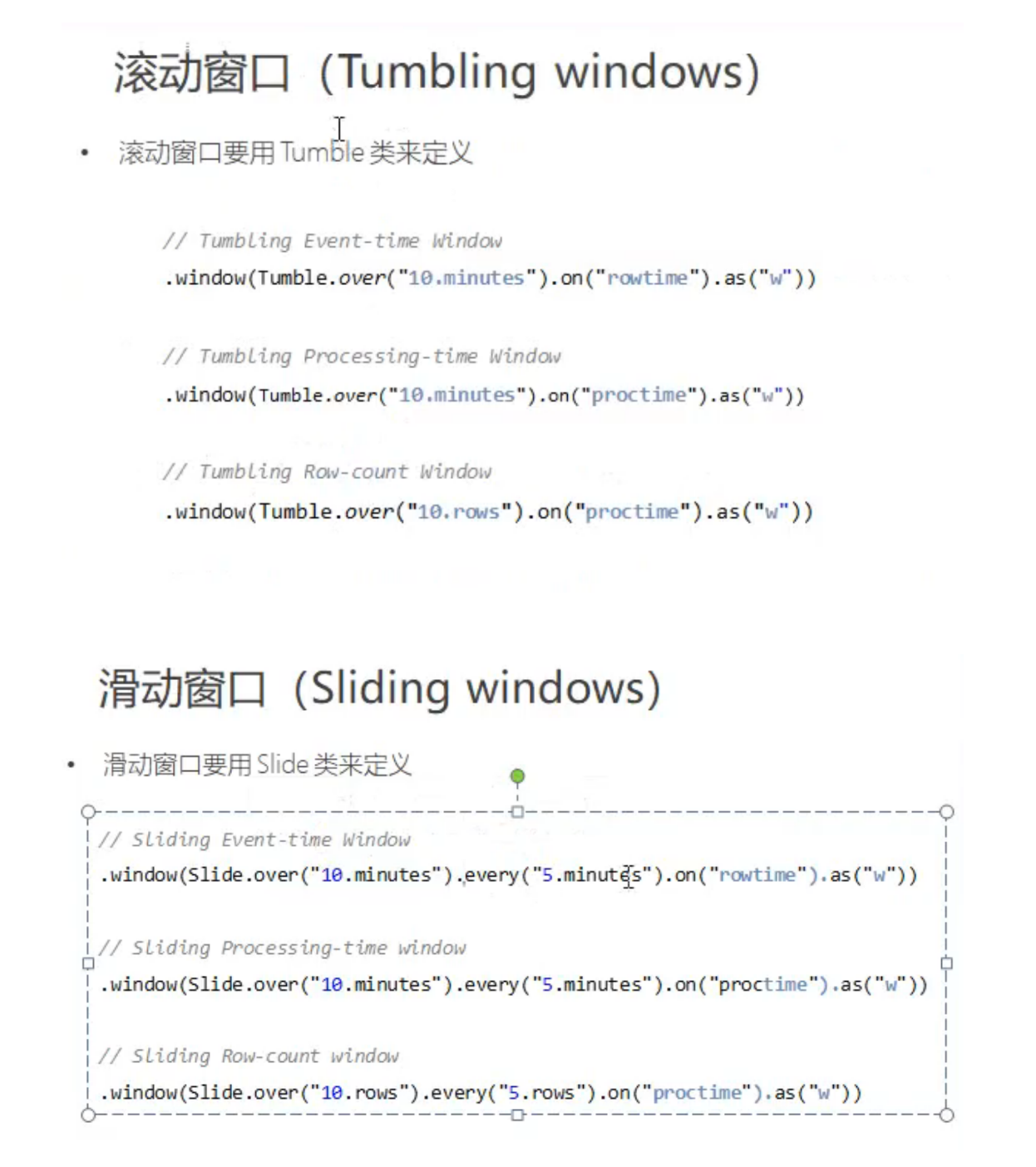
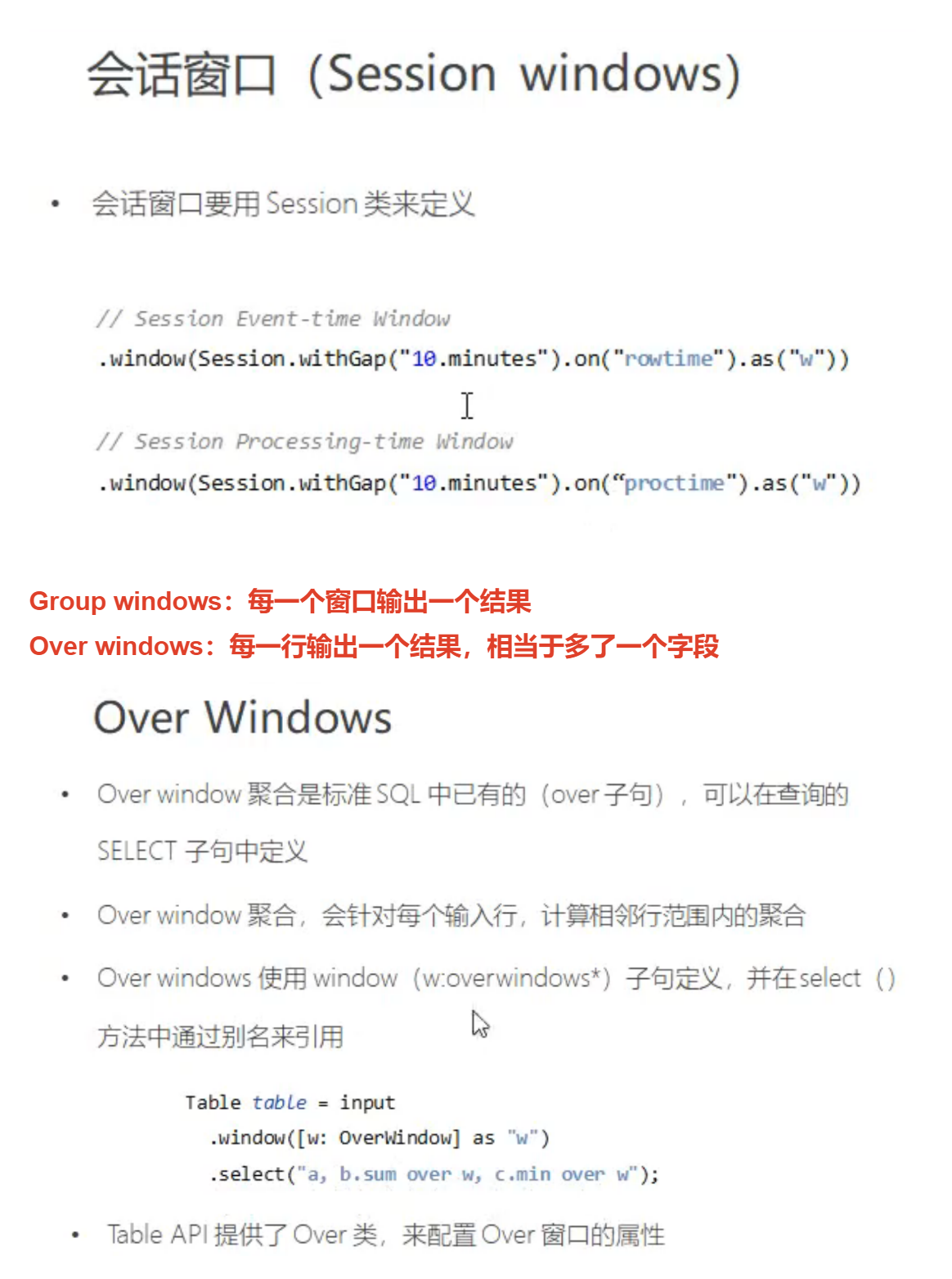
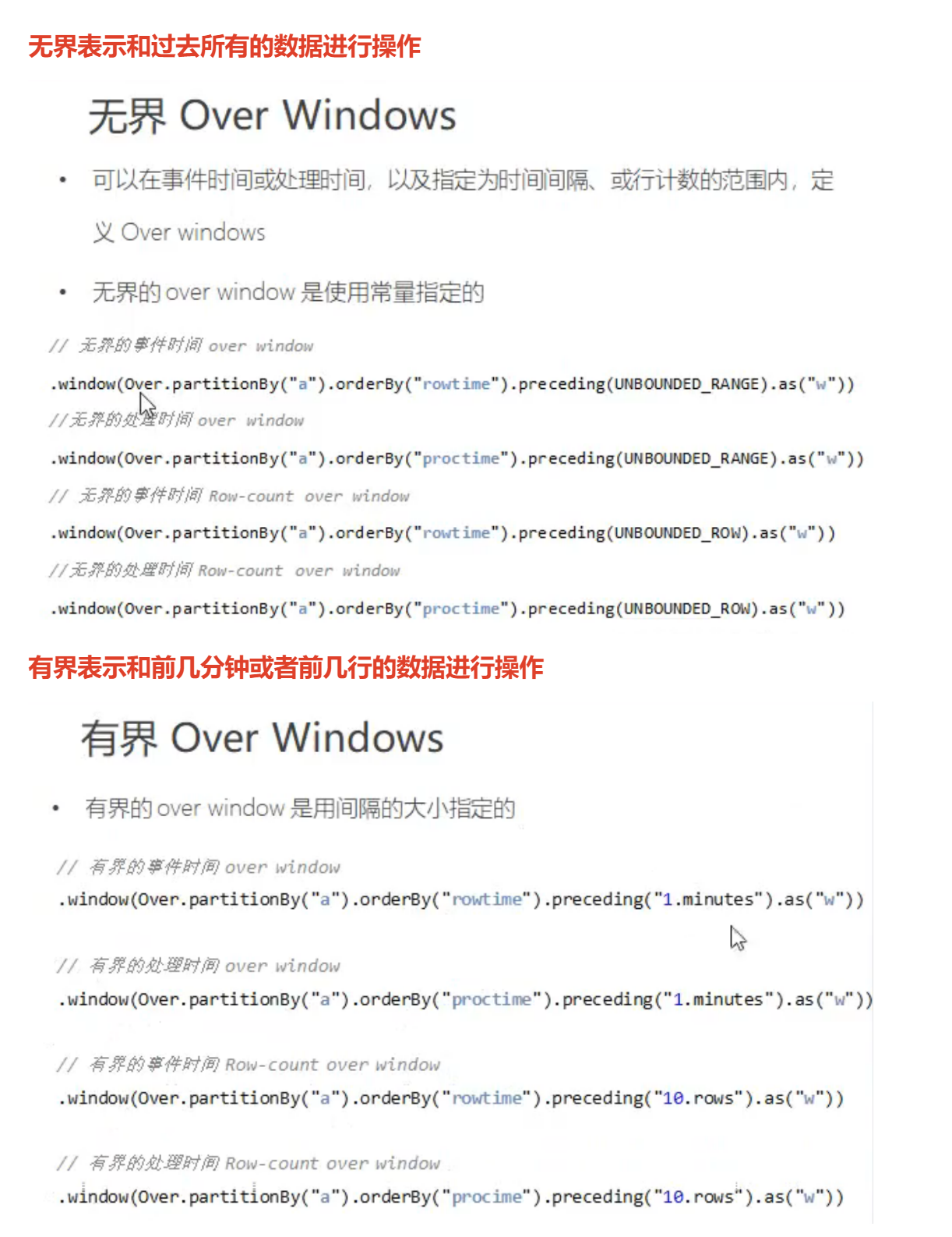
// 4. 将流转换成表,定义时间特性
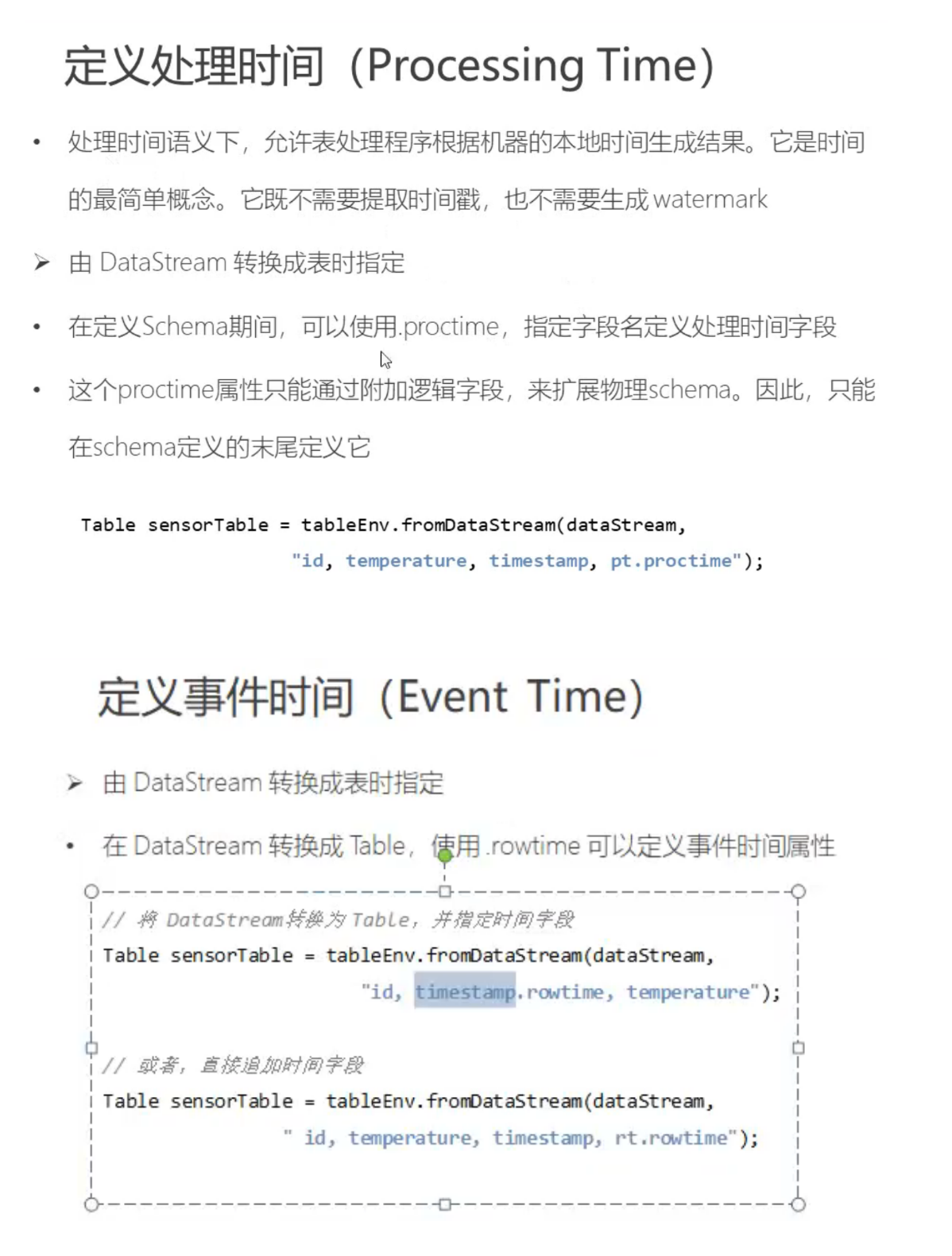
//        Table dataTable = tableEnv.fromDataStream(dataStream, "id, timestamp as ts, temperature as temp, pt.proctime");
        Table dataTable = tableEnv.fromDataStream(dataStream, "id, timestamp as ts, temperature as temp, rt.rowtime");

        tableEnv.createTemporaryView("sensor", dataTable);
// 5. 窗口操作
        // 5.1 Group Window
        // table API
        Table resultTable = dataTable.window(Tumble.over("10.seconds").on("rt").as("tw"))
                .groupBy("id, tw")
                .select("id, id.count, temp.avg, tw.end");

        // SQL
        Table resultSqlTable = tableEnv.sqlQuery("select id, count(id) as cnt, avg(temp) as avgTemp, tumble_end(rt, interval '10' second) " +
                "from sensor group by id, tumble(rt, interval '10' second)");

        // 5.2 Over Window
        // table API
        Table overResult = dataTable.window(Over.partitionBy("id").orderBy("rt").preceding("2.rows").as("ow"))
                .select("id, rt, id.count over ow, temp.avg over ow");

        // SQL
        Table overSqlResult = tableEnv.sqlQuery("select id, rt, count(id) over ow, avg(temp) over ow " +
                " from sensor " +
                " window ow as (partition by id order by rt rows between 2 preceding and current row)");

//        dataTable.printSchema();
//        tableEnv.toAppendStream(resultTable, Row.class).print("result");
//        tableEnv.toRetractStream(resultSqlTable, Row.class).print("sql");
        tableEnv.toAppendStream(overResult, Row.class).print("result");
        tableEnv.toRetractStream(overSqlResult, Row.class).print("sql");

        env.execute();
1
2
3
4
5
6
7
8
9
10
11
12
13
14
15
16
17
18
19
20
21
22
23
24
25
26
27
28
29
30
31
32
33
2
3
4
5
6
7
8
9
10
11
12
13
14
15
16
17
18
19
20
21
22
23
24
25
26
27
28
29
30
31
32
33