
Ch02 Local backup mariadb
# Parpare MariaDB backup
# Test ENV info:
- asflex1(192.168.209.131, 129.69.209.127) ---> controller server
- asflex5(129.69.209.129) ---> backup server
# Prod ENV info:
- astplsm01(129.69.209.168) ---> controller server
- asflex5(129.69.209.129) ---> backup server
# Install the mariaDB on both VMs(it is best that the master is an older version than the slave. MariaDB versions are usually backward compatible)
# For the newest version of mariadb
ref: https://www.digitalocean.com/community/tutorials/how-to-install-mariadb-on-ubuntu-22-04
sudo apt update
sudo apt install mariadb-server
sudo mysql_secure_installation
2
3
# For mariadb 10.3
ref: https://www.gb-media.biz/de/tutorials-snippets/mariadb-10.3-installieren.html
sudo apt-get update
sudo apt-get install software-properties-common
sudo apt-key adv --recv-keys --keyserver hkp://keyserver.ubuntu.com:80 0xF1656F24C74CD1D8
sudo add-apt-repository 'deb [arch=amd64] http://mirror.zol.co.zw/mariadb/repo/10.3/ubuntu bionic main'
sudo apt-get update
sudo apt-get install mariadb-server mariadb-client
2
3
4
5
6
sudo mysql_secure_installation

# Enter current password for root (enter for none): <-- press enter
# Set root password? [Y/n] <-- y
# New password: <-- Enter the new MariaDB root password here
# Re-enter new password: <-- Repeat the password
# Remove anonymous users? [Y/n] <-- y
# Disallow root login remotely? [Y/n] <-- y
# Reload privilege tables now? [Y/n] <-- y
2
3
4
5
6
7
8
9
# Allow remote access
sudo vim /etc/mysql/mariadb.conf.d/50-server.cnf
change ''bind-address'' to 0.0.0.0
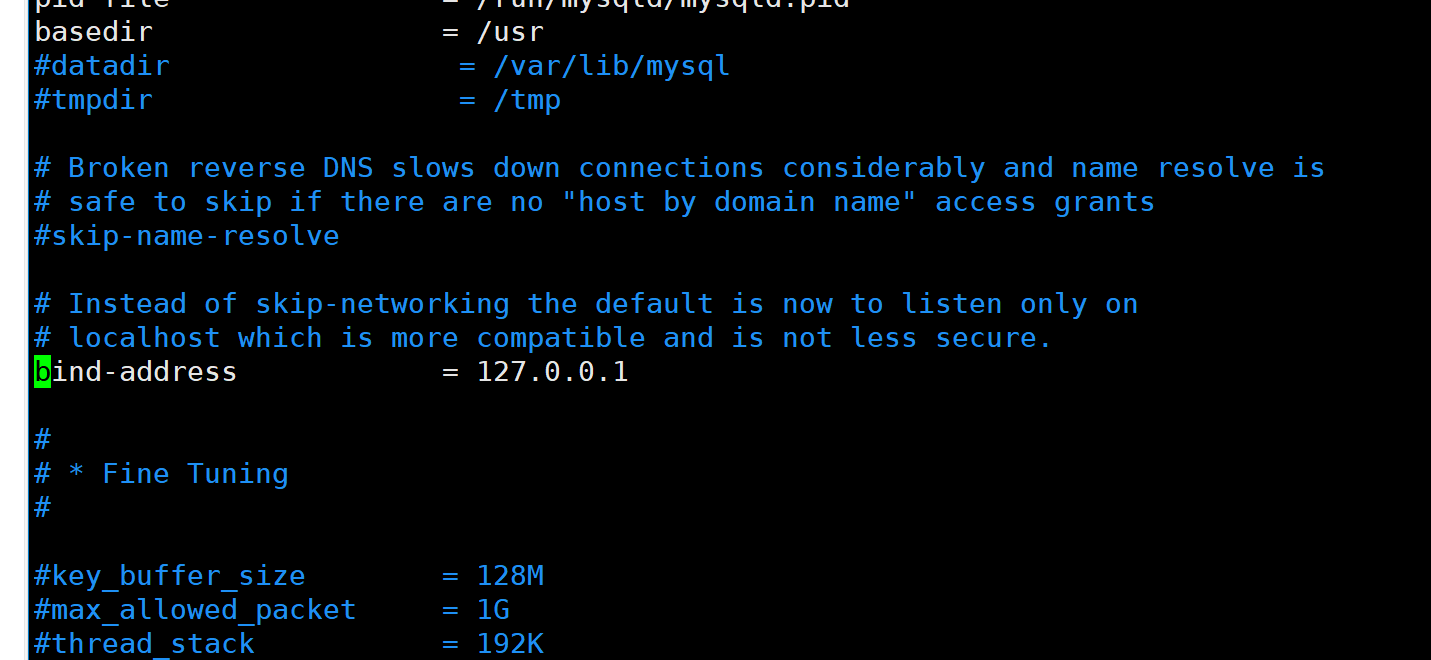
# Restart mariadb
sudo service mysql restart
# Configuring Master-Slave Replication
ref: https://mariadb.com/kb/en/setting-up-replication/
# On master DB
# Set the binlog
sudo vim /etc/mysql/mariadb.conf.d/50-server.cnf
after [mariadb], add: (make sure the server_id is different)
[mariadb]
log-bin
server_id=1
log-basename=master-astplsm01
binlog-format=mixed
2
3
4
5
sudo service mysql restart
# Create the user
CREATE USER 'mariabackup'@'%' IDENTIFIED BY 'passw0rd';
GRANT ALL PRIVILEGES ON *.* TO 'mariabackup'@'%';
FLUSH PRIVILEGES;
2
3
# Lock the table and do the backup
# !!!! If the mysqldump is hanging after the read lock, pls go to the Bottom section: Troubleshoting
# On master: Run after login to mariadb
FLUSH TABLES WITH READ LOCK;

# Open a new command line on master node
sudo mysqldump -u mariabackup -p --all-databases > backup0815.sql

# Copy the backup file to replica server

# On replica: Run after login to mariadb
source backup0815.sql
2
3
4
5
6
7
8
9
10
# Check the status and note the binlog name and position
MariaDB [(none)]> SHOW MASTER STATUS;
+-----------------------------+----------+--------------+------------------+
| File                        | Position | Binlog_Do_DB | Binlog_Ignore_DB |
+-----------------------------+----------+--------------+------------------+
| master-astplsm01-bin.000001 |  4582432 |              |                  |
+-----------------------------+----------+--------------+------------------+
2
3
4
5
6
7
# On replica, start replica
# Give the replica a unique serverid
sudo vim /etc/mysql/mariadb.conf.d/50-server.cnf
[mysqld]
server-id=5
2
sudo service mysql restart
if the replica is not set at the begining of using the database, make sure to following the steps ofthe chapter: Getting the Master's Binary Log Co-ordinates, from https://mariadb.com/kb/en/setting-up-replication/
CHANGE MASTER TO
  MASTER_HOST='129.69.209.168',
  MASTER_USER='mariabackup',
  MASTER_PASSWORD='passw0rd',
  MASTER_PORT=3306,
  MASTER_LOG_FILE='master-astplsm01-bin.000001',
  MASTER_LOG_POS=4582432,
  MASTER_CONNECT_RETRY=10;


START SLAVE;
SHOW SLAVE STATUS \G
2
3
4
5
6
7
8
9
10
11
12
If replication is working correctly, both the values of
Slave_IO_RunningandSlave_SQL_Runningshould beYes:Slave_IO_Running: Yes Slave_SQL_Running: Yes1
2
# Unlock the master db
UNLOCK TABLES;
# TroubleShoting
If the master MariaDB vesion is higher then 10.3. We can not do the dump when holding the READ lock.
The solution are as follows:
# Do not lock the db, and run the mysqldump command with '--master-data'
# The binlog position will be shown in the begining of backup.sql
2
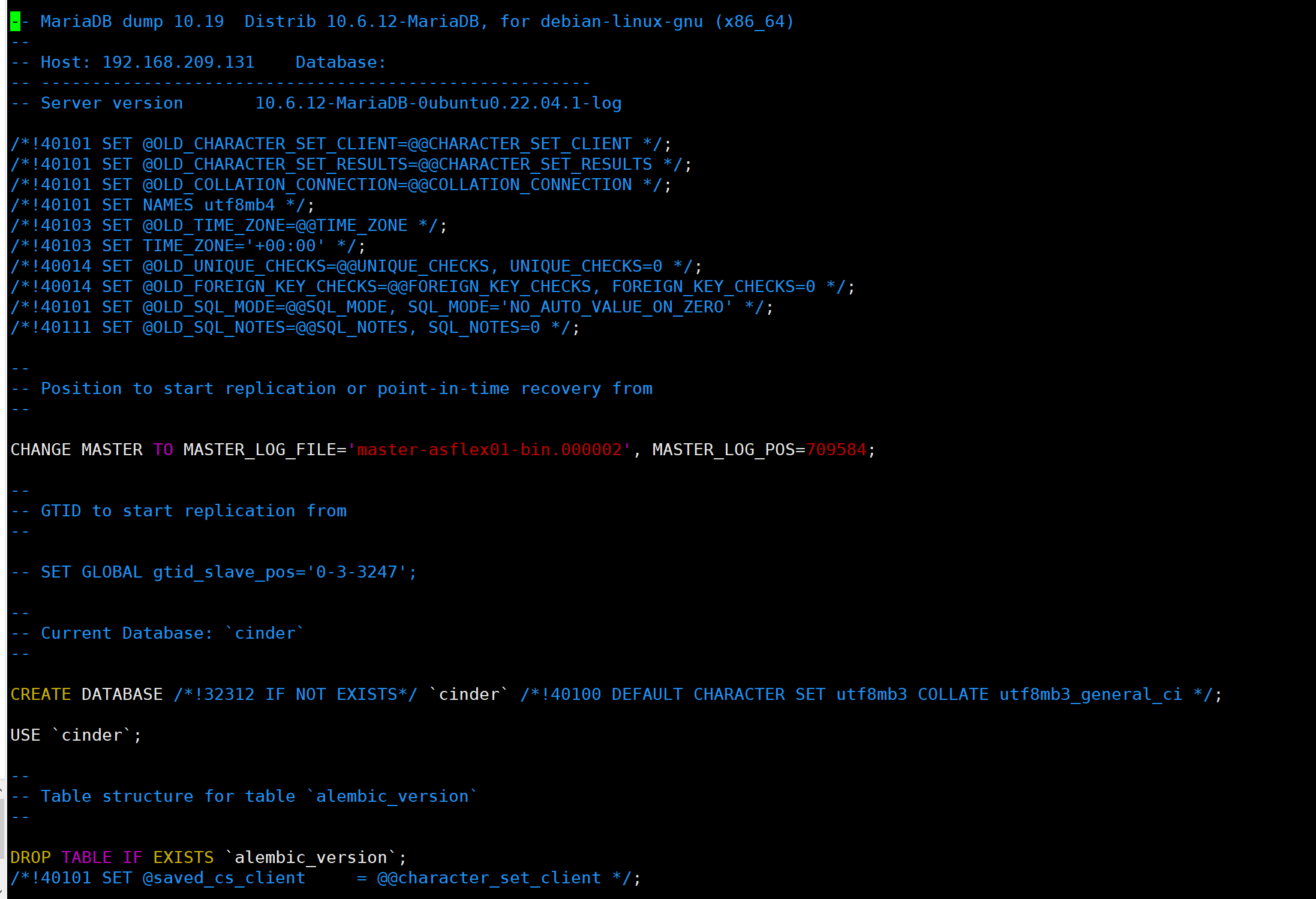
Then just continue with the section "On replica, start replica".